Google search operators are special commands you type into Google to get more precise results. They help SEOs find indexing issues, discover guest post sites, spy on competitors, build links, and conduct content research—all without paid tools. This guide covers every working, unreliable, and deprecated operator, plus real-world workflows you can use today.
Most people type a few words into Google and hope for the best. SEO professionals do something different. They use search operators—short commands that tell Google exactly what to look for, where to look, and what to ignore.
The difference in output is dramatic. A basic search might return millions of vague results. The right operator combination returns dozens of highly targeted, actionable pages. That’s the edge that separates average content marketers from elite SEOs.
This guide covers everything: every operator that still works in 2025, which ones are broken, which ones are dead, and—most importantly—how to combine them into real workflows for link building, competitor research, technical audits, guest post prospecting, and more.
No fluff. No outdated lists. Just a complete, tested reference built to outperform every other guide on the topic.
What Are Google Search Operators?
Google search operators are special characters, words, and commands that modify how Google processes your search query. Instead of relying on Google’s algorithm to guess what you mean, operators give it explicit instructions.
For example:
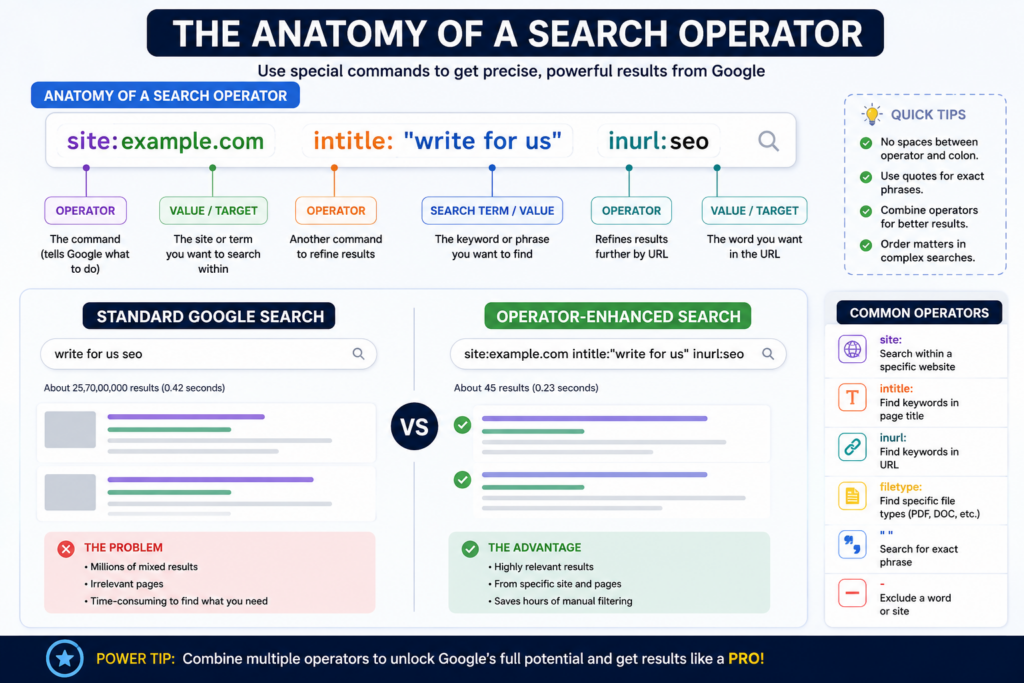
- site:apple.com tells Google to only show results from apple.com
- intitle:”link building” tells Google to only show pages with “link building” in their title tag
- filetype:pdf tells Google to return PDF files only
Operators fall into two main groups:
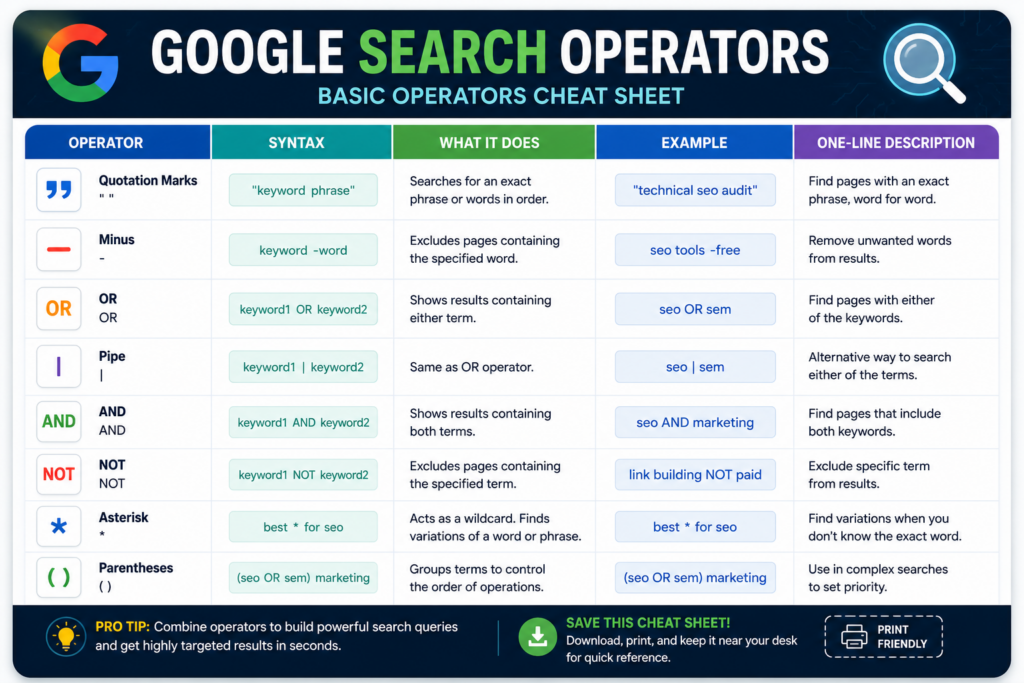
Basic operators modify standard searches. Quotation marks, the minus sign, and the wildcard (*) are the most common examples. Most people have used at least one of these without realizing it has an official name.
Advanced operators combine a command prefix (like site: or inurl:) with a search term to filter results by specific page attributes—URL structure, title tag content, file type, publication date, and more.
Together, they form a mini search language that gives you precision control over Google’s 8.5 billion daily searches.
Why Google Search Operators Matter for SEO
Search operators aren’t just a power-user trick. They’re a core part of any serious SEO workflow because they let you do things no standard search can replicate.
Here’s a quick breakdown of what they unlock:
| Goal | Operator Combination |
| Check indexed pages | site:yourdomain.com |
| Find duplicate content | “exact sentence” -site:yourdomain.com |
| Discover guest post opportunities | intitle:”write for us” “your niche” |
| Find competitor pages | site:competitor.com intitle:”keyword” |
| Locate resource pages | inurl:resources intitle:resources “topic” |
| Identify broken link targets | site:domain.com inurl:resources -inurl:https |
| Find PDF resources | “keyword” filetype:pdf |
| Prospect for outreach | inurl:author/”first-last” |
Whether you’re a beginner blogger trying to find guest post opportunities or a technical SEO running a full site audit, operators save you hours every week.
Basic Search Operators: The Foundation
These operators modify standard text searches. They’re simple, universally supported, and work reliably across all Google properties.
| Operator | What It Does | Real Google Example | SEO Use Case | Beginner Tip |
| ” ” (quotes) | Forces an exact phrase match | “technical seo audit” | Find pages targeting an exact keyword phrase | Use quotes when you need results that contain a specific phrase word-for-word |
| – (minus) | Excludes a word from results | seo tools -free | Remove irrelevant results from research | Add a minus sign before any word you want Google to ignore |
| OR | Shows results with either term | seo OR sem | Broaden searches across multiple keywords | OR must be uppercase; lowercase “or” is treated as a regular word |
| | (pipe) | Same as OR | seo | sem | Faster alternative to OR in complex queries | Use the pipe symbol when combining many operators |
| AND | Ensures both terms appear | seo AND “content marketing” | Find content that covers two specific topics | AND is usually the default; use it explicitly when combining operators |
| NOT | Excludes a term (same as -) | link building NOT paid | Remove paid/spam results from prospecting lists | Same function as minus, less commonly used |
| * (wildcard) | Replaces an unknown word | best * for seo | Find keyword variations you haven’t thought of | Useful when you know part of a phrase but not all of it |
| ( ) (parentheses) | Groups terms for complex logic | (seo OR sem) marketing | Combine multiple operator sets in one query | Think of parentheses like brackets in math—they set priority |
Advanced Search Operators: The Full List
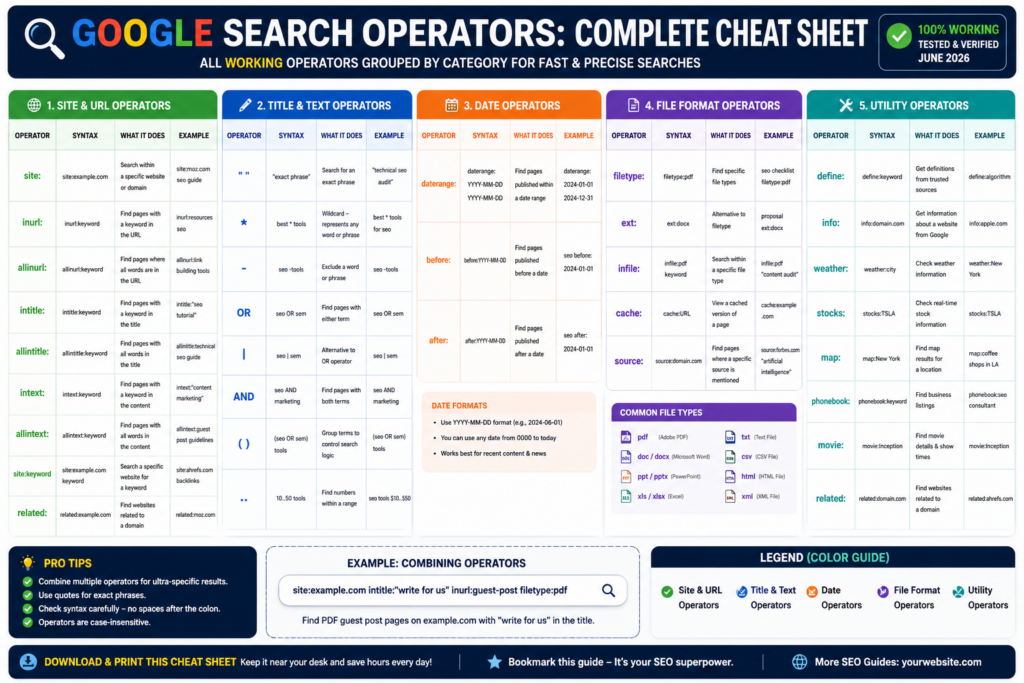
Advanced operators use a prefix followed by a colon and a search term. They filter results by specific page attributes. No spaces between the colon and search term—site:example.com works; site: example.com does not.
Site & URL Operators
| Operator | Syntax | What It Does | Real Example | SEO Use Case | Marketing Use Case |
| site: | site:domain.com | Restricts results to a specific website or subdomain | site:moz.com link building | Check how many pages Google has indexed for any domain | Audit a brand’s entire web presence before a partnership |
| inurl: | inurl:keyword | Finds a word or phrase inside a page’s URL | inurl:write-for-us “seo” | Find guest post pages, category pages, or specific URL patterns | Locate product or landing pages with specific URL structures |
| allinurl: | allinurl:term1 term2 | All listed words must appear in the URL | allinurl:best seo tools | Find pages built around exact URL keyword targets | Identify competitor URL structures at scale |
| related: | related:domain.com | Finds websites similar to a given domain | related:semrush.com | Identify direct competitors you may have missed | Research media outlets similar to existing press contacts |
| groupbyurl: | groupbyurl:keyword | Groups results by domain to reduce duplicates | groupbyurl:seo agency | Cleaner prospecting results without repeat domains | Reduce duplicate brand mentions in media monitoring |
Title & Text Operators
| Operator | Syntax | What It Does | Real Example | SEO Use Case | Marketing Use Case |
| intitle: | intitle:keyword | Finds pages with a word in their HTML title tag | intitle:”link building guide” | Gauge competition for a keyword by title tag presence | Find competitor ads or landing pages targeting a keyword |
| allintitle: | allintitle:word1 word2 | All listed words must appear in the title tag | allintitle:seo beginner guide 2025 | Check keyword difficulty by title competition | Find roundup posts mentioning multiple competitor names |
| intext: | intext:keyword | Finds a word or phrase in a page’s body content | intext:”submit a guest post” | Find sites accepting contributions that don’t use standard footprints | Monitor for unlinked brand mentions in body text |
| allintext: | allintext:word1 word2 | All listed words must appear in body content | allintext:seo audit checklist | Find comprehensive guides covering multiple specific topics | Identify content covering all your campaign talking points |
| AROUND(X) | term1 AROUND(3) term2 | Both terms must appear within X words of each other | SEO AROUND(3) strategies | Find contextually related mentions, not just co-occurrences | Detect brand-adjacent discussions with competitors |
File Format Operators
| Operator | Syntax | What It Does | Real Example | SEO Use Case | Marketing Use Case |
| filetype: | filetype:pdf | Finds specific file types (PDF, DOCX, XLSX, PPT) | seo guide filetype:pdf | Find downloadable resources to use as content research or link targets | Source credible PDF studies to cite in content |
| ext: | ext:pdf | Identical to filetype: | seo audit ext:pdf | Use interchangeably with filetype: | Same as above—just an alternative syntax |
Date Operators
| Operator | Syntax | What It Does | Real Example | SEO Use Case | Marketing Use Case |
| before: | before:YYYY-MM-DD | Finds content published before a specific date | “seo trends” before:2023-01-01 | Research how topics were covered before a major algorithm update | Find outdated competitor content ripe for replacement |
| after: | after:YYYY-MM-DD | Finds content published after a specific date | seo tools after:2024-01-01 | Find recently published competitor posts | Research the freshest coverage of a trending topic |
Info & Utility Operators
| Operator | Syntax | What It Does | Example | Notes |
| define: | define:backlink | Shows a dictionary or knowledge panel definition | define:anchor text | Useful for checking how Google understands a term |
| source: | source:publication | Returns news results from a specific publisher (Google News) | “core update” source:search_engine_journal | Monitor how specific publications cover SEO topics |
| weather: | weather:city | Displays current weather | weather:new york | Not an SEO tool; Google Feature |
| stocks: | stocks:GOOG | Shows stock data for a ticker | stocks:AAPL | Google Feature—not an SEO tool |
| map: | map:location | Forces map results | map:silicon valley | Useful for local SEO research—see local pack competition |
| in | $100 in GBP | Converts units or currencies | 50 miles in km | Quick conversion tool built into search |
| movie: | movie:title | Shows movie info and showtimes | movie:inception | Google Feature |
| author: | author:”Name” | Finds content attributed to a specific author | author:”Brian Dean” | Find prolific writers in your niche for outreach |
| filetype: + patent: | patent:search algorithm | Finds specific patents | patent:page rank | Research competitor technology patents |
Unreliable Operators: Use With Caution
These operators haven’t been officially deprecated, but their results are inconsistent. They may work sometimes, fail silently at other times, or return low-quality results. Always verify output before using in critical workflows.
| Operator | What It’s Supposed to Do | Why It’s Unreliable |
| #..# (number range) | Search between a range of two numbers (e.g., $50..$100) | Behavior is inconsistent; often ignores the range entirely |
| inanchor: | Finds pages with specific anchor text in inbound links | Google no longer reliably supports anchor text filtering |
| allinanchor: | Multiple words in anchor text | Same as above—hit-or-miss |
| loc: / location: | Restricts results to a geographic area | Rarely works as intended; very inconsistent |
| daterange: | Finds results within a Julian date range | Requires complex date conversion; almost never works correctly |
Deprecated Operators: These Are Dead
Google has officially retired these operators. They return no useful results today. Many older blog posts still list them as “working”—they are not. Avoid wasting time on any of these.
| Operator | What It Used to Do | When Google Killed It |
| cache: | Showed Google’s cached version of a page | 2024 — use the Wayback Machine instead |
| ~ | Included synonyms in results | 2013 |
| + | Forced exact match for a single word | 2011 (replaced by quotes) |
| link: | Found pages linking to a specific URL | 2017 |
| info: / id: | Showed basic site information | 2017 |
| phonebook: | Found phone numbers for businesses | 2010 |
| # | Searched Google+ hashtags | 2019 (Google+ shut down) |
| inpostauthor: | Found posts by a specific author in Google Blog Search | Dropped when Blog Search ended |
| allinpostauthor: | Same as above, without quotes | Dropped when Blog Search ended |
| inposttitle: | Searched blog post titles | Dropped when Blog Search ended |
| blogurl: | Searched specific blog URLs | Officially dropped |
💡 Important: The cache: operator was one of the most commonly used operators for SEO debugging. Its removal in 2024 surprised many practitioners. To view a cached or historical version of any page, use the Internet Archive Wayback Machine instead.
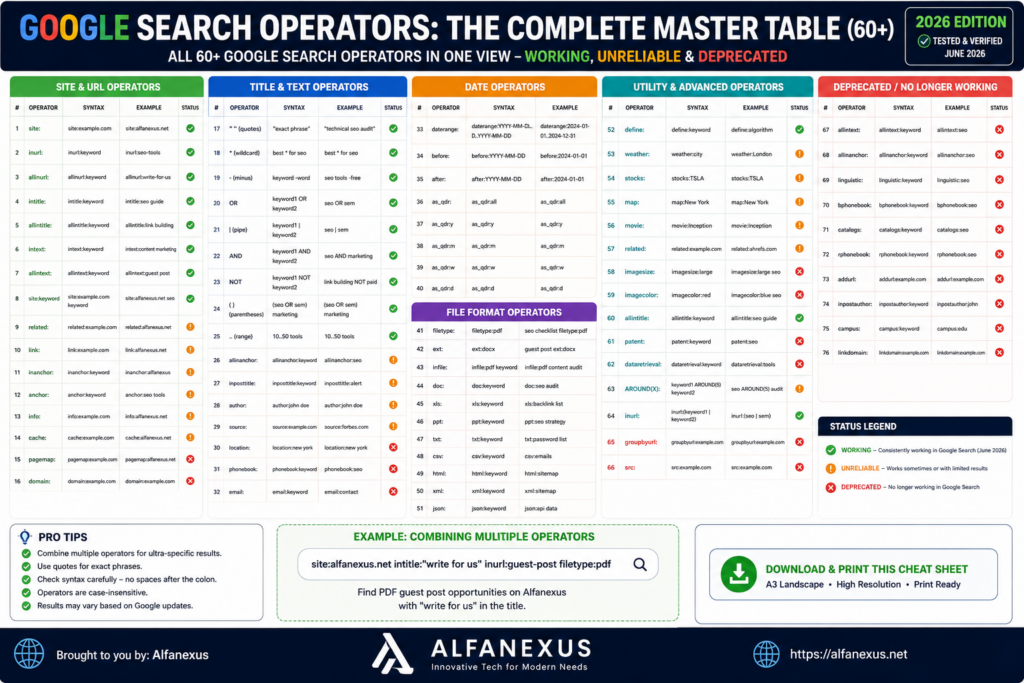
Complete Reference Table: Every Operator at a Glance
| Operator | Status | Purpose |
| ” “ | ✅ Working | Exact phrase match |
| – | ✅ Working | Exclude term |
| OR / | | ✅ Working | Either/or logic |
| AND | ✅ Working | Both terms required |
| * | ✅ Working | Wildcard |
| ( ) | ✅ Working | Group operators |
| site: | ✅ Working | Restrict to domain |
| inurl: | ✅ Working | Word in URL |
| allinurl: | ✅ Working | All words in URL |
| intitle: | ✅ Working | Word in title tag |
| allintitle: | ✅ Working | All words in title |
| intext: | ✅ Working | Word in body content |
| allintext: | ✅ Working | All words in body |
| filetype: / ext: | ✅ Working | Specific file type |
| before: | ✅ Working | Content before date |
| after: | ✅ Working | Content after date |
| related: | ✅ Working | Similar sites |
| define: | ✅ Working | Word definition |
| source: | ✅ Working | Specific news source |
| author: | ✅ Working | Content by author |
| AROUND(X) | ⚠️ Unreliable | Proximity search |
| inanchor: | ⚠️ Unreliable | Anchor text search |
| allinanchor: | ⚠️ Unreliable | Multiple anchor words |
| loc: / location: | ⚠️ Unreliable | Geographic filter |
| daterange: | ⚠️ Unreliable | Julian date range |
| #..# | ⚠️ Unreliable | Number range |
| cache: | ❌ Deprecated (2024) | Cached page view |
| link: | ❌ Deprecated (2017) | Backlink finder |
| info: / id: | ❌ Deprecated (2017) | Site info |
| ~ | ❌ Deprecated (2013) | Synonym search |
| + | ❌ Deprecated (2011) | Forced exact word |
| phonebook: | ❌ Deprecated (2010) | Phone number lookup |
Practical SEO Use Cases and Real Workflows
Knowing operators is one thing. Using them strategically is another. Here’s how real SEO professionals use search operators as part of daily and weekly workflows.
Link Building Workflow
Link building is where search operators deliver the most immediate ROI. Use this workflow to find prospects, qualify them, and prepare outreach lists—all in Google, for free.
Step 1 — Find topically relevant domains:
intitle:”write for us” “digital marketing” -site:linkedin.com -site:medium.com
Step 2 — Find resource pages that already link to competitors:
“[your niche]” inurl:resources intitle:resources
Step 3 — Find pages mentioning your competitors but not you:
“best [category] tools” -[yourbrandname]
Step 4 — Find prolific guest bloggers in your niche:
inurl:author/[firstname-lastname] “[your topic]”
Step 5 — Find unlinked brand mentions:
“[Your Brand Name]” -site:yourdomain.com -site:twitter.com -site:linkedin.com
🖼️ Visual Suggestion: Flowchart showing the 5-step link building workflow with operator strings at each step, decision branches (e.g., “Is the site relevant? → Yes → Add to outreach list”), and a final output box labeled “Qualified Link Prospects.”
Competitor Research Workflow
Understanding a competitor’s content strategy takes minutes with the right operators.
Find their most frequently published content type:
site:competitor.com intitle:(“how to” OR “guide” OR “tips”)
See how much they’ve published recently:
site:competitor.com after:2024-01-01
Find their top-performing topic clusters:
site:competitor.com inurl:blog “keyword”
Find content gaps—topics they’ve covered that you haven’t:
site:competitor.com “topic” -site:yourdomain.com
Discover similar competitor domains:
related:competitor.com -site:competitor.com
Guest Post Prospecting
Standard “write for us” search (widely used, still effective):
intitle:”write for us” “your niche”inurl:write-for-us “your niche”intitle:”guest post” “your niche”inurl:guest-post-guidelines “your niche”
More creative footprints that fewer people use:
intitle:”contribute to” “your niche”inurl:submit-article “your niche”intitle:”become a contributor” “your niche””guest author” inurl:blog “your niche”
Combine for ultra-targeted results:
(intitle:”write for us” OR inurl:contribute) “content marketing” -site:medium.com
💡 Pro Tip: Sites using multiple guest post footprints in their URL (/write-for-us/, /guest-posts/, /contribute/) are often active contributor programs with real editorial standards. These tend to produce higher-quality backlinks than sites with no clear guidelines page.
Finding PDF Files and Resource Documents
PDF files are excellent for link building (resource page targets), content research, and sourcing citable data.
Find PDFs on a specific topic:
“keyword” filetype:pdf
Find PDFs from authoritative domains only:
“seo guide” filetype:pdf site:.edu OR site:.gov
Find competitor whitepapers or lead magnets:
site:competitor.com filetype:pdf
Find indexed PDFs on your own site that should be gated:
site:yourdomain.com filetype:pdf
Finding Indexable and Non-Indexable Pages
Site audits often start with a site: search. Here’s what to look for:
Check total indexed pages:
site:yourdomain.com
Find pages that shouldn’t be indexed (PDFs, parameter URLs):
site:yourdomain.com filetype:pdfsite:yourdomain.com inurl:?
Find pages without HTTPS:
site:yourdomain.com -inurl:https
Find thin or low-value pages being indexed:
site:yourdomain.com inurl:tagsite:yourdomain.com inurl:author
Finding Duplicate Content
Duplicate content—whether internal or external—can hurt rankings. Search operators help you identify both types quickly.
Check if your content has been scraped:
“[paste a unique sentence from your article]” -site:yourdomain.com
Find internal duplicate title tags:
site:yourdomain.com intitle:”[page title]”
Find syndicated content you didn’t authorize:
“[unique paragraph]” -site:yourdomain.com
Finding Broken Pages (for Link Reclamation)
Find pages on your site returning errors (combine with a crawler for best results):
site:yourdomain.com -inurl:https intitle:”404″ OR intitle:”not found”
Find competitor pages that may have been removed:
site:competitor.com “page not found”
These serve as targets for broken link building—find the dead pages, find who links to them, then pitch your replacement content.
Finding Resource Pages
Resource pages are curated lists of links on a specific topic. Getting your content listed on them is one of the fastest link building tactics available.
Standard resource page searches:
[topic] intitle:resources inurl:resources[topic] “useful resources” OR “helpful links”[topic] inurl:links intitle:links
Tip: Add -inurl:pdf -filetype:pdf to exclude PDF resource lists that aren’t webpage link roundups.
Searching Social Profiles
Find Twitter/X mentions with an operator:
site:x.com “keyword”
Find LinkedIn articles:
site:linkedin.com/pulse “your keyword”
Find Quora threads about a topic:
site:quora.com inurl:”keyword-phrase”
Find Reddit discussions:
site:reddit.com “best seo tools” after:2024-01-01
Local SEO Examples
Find local competitors:
map:dentist “city name”related:localcompetitor.com
Find local guest post or PR opportunities:
intitle:”write for us” “city name”inurl:blog “city name” “business topic”
Find local resource pages:
“city name” inurl:resources “business category”
Google Dork Examples
A “Google dork” is a search operator query used to uncover sensitive or hidden information. The term originated in security research, but SEOs use similar techniques to find valuable pages that aren’t immediately visible.
Important: Only use these queries for legitimate research, competitive intelligence, and your own site auditing. Accessing protected information without permission is illegal.
| Purpose | Query |
| Find exposed admin login pages | intitle:”admin login” site:competitor.com |
| Find server configuration files | filetype:env “DB_PASSWORD” |
| Find exposed Excel files | site:domain.com filetype:xlsx |
| Find test pages left live | intitle:”test page” site:domain.com |
| Find sitemap files | site:domain.com filetype:xml inurl:sitemap |
| Find robots.txt | site:domain.com inurl:robots.txt |
| Find pages with “under construction” | site:domain.com intitle:”coming soon” |
Filetype Searches: Going Deeper
Beyond PDFs, Google indexes dozens of file types. Here are the most useful for SEOs and content researchers:
| File Type | Operator | Use Case |
| filetype:pdf | Whitepapers, academic research, downloadable guides | |
| DOCX | filetype:docx | Templates, proposals, strategy documents |
| XLSX | filetype:xlsx | Data sets, keyword lists, financial reports |
| PPTX | filetype:pptx | Slide decks, presentations, conference materials |
| CSV | filetype:csv | Raw data, export files, keyword data |
| TXT | filetype:txt | Plain text data, log files |
| RTF | filetype:rtf | Rich text documents, reports |
Practical example for content research:
“social media statistics 2025” filetype:pdf site:.edu OR site:.org
This returns academic and organizational PDF reports on social media stats—the kind of credible sources that improve EEAT in your content.
Site Searches: What site: Really Tells You
The site: operator is the most versatile in an SEO’s toolkit. But most people only scratch the surface of what it can do.
Basic domain check:
site:yourdomain.com
Restrict to a subdomain:
site:blog.yourdomain.com
Restrict to a subfolder:
site:yourdomain.com/blog
Combine with keywords to find relevant indexed pages:
site:yourdomain.com “internal linking”
Find competitor blog content structure:
site:competitor.com inurl:blog
Compare competitor blog output over time:
site:competitor.com after:2024-01-01 before:2025-01-01
Find pages with specific title structures:
site:competitor.com intitle:(“what is” OR “how to”)
🖼️ Visual Suggestion: Screenshot-style mock-up showing a site: search result with annotations explaining what each part of the SERP tells you (number of indexed pages, URL structures, title patterns, breadcrumb paths).
Combining Multiple Operators: Power Queries
Single operators are useful. Combined operators are transformational. Here are the most effective multi-operator combinations, organized by goal.
SEO Research Combos
Find internal linking opportunities:
site:yourdomain.com “target keyword” -inurl:target-page-url
Find pages that mention a topic but don’t have it in the title:
site:yourdomain.com intext:”keyword” -intitle:”keyword”
Find thin content (pages with few words in the title):
site:yourdomain.com intitle:”tag” OR intitle:”category”
Link Building Combos
Guest post opportunities in a competitive niche:
(intitle:”write for us” OR inurl:contribute OR inurl:guest-post) “fintech” -site:medium.com -site:linkedin.com
Resource pages recently updated:
intitle:resources inurl:resources “seo” after:2023-01-01
Find competitor mentions for outreach:
“[Competitor Brand]” intitle:”review” -site:competitor.com after:2024-01-01
Content Research Combos
Find academic sources for a topic:
“machine learning” filetype:pdf site:.edu after:2023-01-01
Find Reddit discussions from the past year:
site:reddit.com “keyword” after:2024-01-01
Find recently updated competitor content:
site:competitor.com intitle:”guide” after:2024-06-01
Technical SEO Combos
Find pages with likely indexation issues:
site:yourdomain.com inurl:? -inurl:https
Find accidentally indexed staging or dev pages:
site:yourdomain.com inurl:staging OR inurl:dev OR inurl:test
Find duplicate meta titles:
site:yourdomain.com allintitle:”[Duplicate Title Text]”
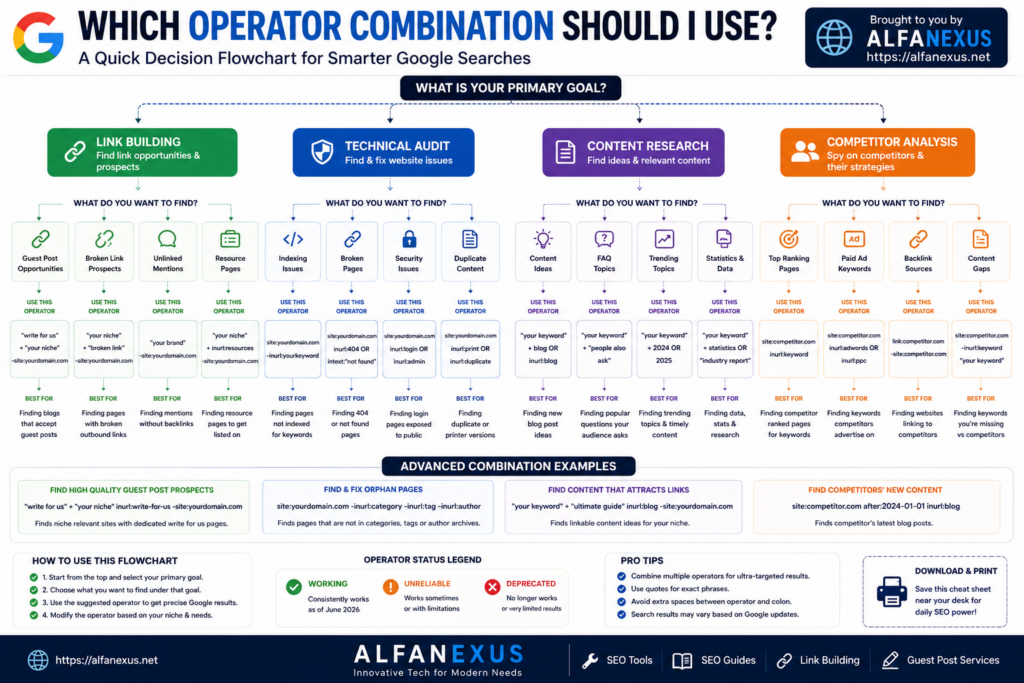
Expert SEO Tips and Hidden Techniques
Tip 1: Bypass AI Overviews for Clean Results
Google’s AI Overviews can push organic results far down the page. To remove them and see classic results, run your search, then append &udm=14 to the end of the URL in your browser’s address bar. This forces Google to return the traditional “10 blue links” layout—perfect for clean SEO research.
Tip 2: Use @ for Social Platform Searches
The @ operator searches a topic on social platforms. Use @x “seo tips” instead of @twitter “seo tips” to find relevant posts on X (formerly Twitter).
Tip 3: The Minus Sign Stacks
You can exclude multiple terms in a single query: “best seo tools” -free -cheap -“money back”. Each additional minus sign removes another layer of noise.
Tip 4: Use before: and after: Without Full Dates
You don’t need to specify a month and day. before:2020 and after:2024 both work. Use the full format (YYYY-MM-DD) when you need precise date ranges for technical audits.
Tip 5: Combine site: with Negative Operators to Find Gaps
site:yourdomain.com “topic” -inurl:topic-slug
This finds pages on your site that mention a topic but don’t link to your main pillar page for it—a quick internal link opportunity finder.
Tip 6: Use OR with Parentheses for Broader Prospecting
site:reddit.com (inurl:seo OR inurl:marketing OR inurl:content-strategy)
This returns threads from multiple relevant subreddits in one search.
Tip 7: Find Niche Directories with inurl:
inurl:directory “submit site” “your niche”
This finds niche-specific directories you can submit to for citation and link building.
Tip 8: Verify If a Specific Page Is Indexed
site:yourdomain.com/exact-url-slug
If the page appears in results, Google has it indexed. If nothing shows up, the page either doesn’t exist, is blocked, or hasn’t been crawled yet.
Common Mistakes to Avoid
Adding spaces after the colon:site: example.com returns nothing useful. The correct syntax is always site:example.com with no space.
Using lowercase OR and AND: Boolean operators must be uppercase. seo or sem is treated as a regular search. seo OR sem triggers the OR logic.
Relying on deprecated operators: Many guides still list cache:, link:, and ~ as working operators. They’re not. Using them wastes your time.
Using only one operator when two would be better: Single operators return broad results. Combining intitle: with inurl: and -site: creates dramatically more targeted queries.
Treating site: counts as exact indexation numbers: The number of results shown for a site: query is an estimate, not a precise count. Use Google Search Console for accurate indexation data.
Overcomplicating queries: More operators don’t always mean better results. Start simple, add operators one at a time, and verify that each one improves your results before adding another.
Best Practices for Using Search Operators
Test before trusting: Google changes operator behavior without announcement. The cache: operator disappeared in 2024 with no official warning. Always test an operator before building a workflow around it.
Build operator templates: Create a spreadsheet of your most-used queries with blank spaces for variables. For example: intitle:”write for us” “[YOUR NICHE]” -site:medium.com. Fill in the variable and run the query every week.
Pair with third-party tools: Search operators are powerful, but they show you URLs—not metrics. Pair your results with tools like Ahrefs, Moz, or SEMrush to check Domain Rating, traffic estimates, and link profiles before spending time on outreach.
Use after: regularly: The internet moves fast. Adding after:2024-01-01 to most queries filters out outdated content and gives you fresher, more relevant results.
Document your findings: When a search operator combination produces great results, save it. Build a personal library of effective queries. Over time, this becomes one of your most valuable SEO assets.
Limitations of Google Search Operators
Even the most advanced operator queries have meaningful constraints you should understand before relying on them.
Google doesn’t guarantee accuracy: The number of results shown for a site: search is an approximation. Google’s documentation explicitly states that search operator results aren’t intended to be used as definitive indexation counts.
Operators can be silently broken: Google rarely announces changes to operator behavior. cache: was available one day and gone the next. This means any operator could theoretically disappear without warning.
Results are limited to indexed pages: If a page isn’t indexed, no operator can find it. Search operators are tools for navigating what Google knows, not what exists on the web.
No direct backlink data: The old link: operator is dead. Google’s search results cannot show you who links to a page. You need a third-party tool like Ahrefs or Moz for backlink data.
Geographic targeting is unreliable: The loc: and location: operators work inconsistently. For local SEO research, use Google’s location filter in search settings or Google Business Profile insights instead.
Rate limiting: Running too many operator searches in a short time can trigger Google’s bot detection, resulting in CAPTCHAs or temporary blocks. Space out your research sessions and avoid automated scraping of search results.
Frequently Asked Questions
What are Google search operators?
Google search operators are special commands and characters that extend what a standard text search can do. They filter Google results by specific attributes—URL structure, page title, file type, publication date, and more—giving SEOs, researchers, and content professionals precise control over search output.
Are Google search operators case-sensitive?
Most are not. site: and SITE: produce identical results. However, Boolean operators (OR, AND, NOT) must be uppercase. If you type them in lowercase, Google treats them as regular search words.
What is the most useful search operator for SEO?
The site: operator is the most universally useful for SEO. It allows you to check indexed pages, audit a competitor’s content structure, identify indexation issues, and find internal linking opportunities—all in one command.
How do I use search operators to find guest post opportunities?
Combine intitle: or inurl: with common guest post footprints and your niche topic. For example: intitle:”write for us” “digital marketing” or inurl:guest-post-guidelines “seo”. For less competition, try less common footprints like intitle:”become a contributor” or inurl:submit-article.
Can I combine multiple operators in one query?
Yes, and this is where search operators become truly powerful. You can stack multiple operators to create highly specific queries. For example: site:competitor.com intitle:”how to” filetype:pdf after:2024-01-01 finds how-to PDF guides published by a competitor in the last year.
Why is my search operator not returning results?
The most common cause is an accidental space between the colon and your search term. site: example.com won’t work; site:example.com will. Also check that you’re not using a deprecated operator—cache:, link:, and info: no longer function in Google.
What happened to the cache: operator?
Google deprecated the cache: operator in early 2024. It had previously shown a cached version of any webpage. The most reliable replacement is the Wayback Machine from the Internet Archive, which stores historical snapshots of billions of web pages.
What is the difference between intitle: and allintitle:?
intitle:keyword requires only that one specific word appears in the title tag. allintitle:word1 word2 requires all listed words to appear in the title tag. Use allintitle: to assess exact competition for multi-word keyword phrases.
How can I use search operators to find duplicate content on my site?
Take a unique sentence from one of your pages—something that wouldn’t appear elsewhere organically—and search for it in quotes: “your unique sentence here”. Add -site:yourdomain.com to exclude your own pages and see if anyone has copied your content.
What is a Google dork and is it legal?
A Google dork is a search operator query used to find specific or sensitive information that standard searches wouldn’t surface. In the context of SEO, dorks are used to find misconfigured pages, exposed files, or hidden site structures. Using them for legitimate research, site auditing, or competitive intelligence is legal. Using them to access protected systems or private data without authorization is not.
Can I use search operators on Google Images?
Yes, partially. The imagesize: operator works exclusively in Google Images and finds images by dimension (e.g., imagesize:1200×800). The src: operator finds pages referencing a specific image URL. Most other operators (site:, filetype:, inurl:) also work in Google Images with varying effectiveness.
What is the AROUND(X) operator and does it still work?
AROUND(X) is a proximity operator that finds two terms within X words of each other. For example, SEO AROUND(5) strategy finds pages where “SEO” and “strategy” appear within five words of each other. It’s listed as unreliable—it works sometimes but produces inconsistent results.
How do I find resource pages for link building with operators?
Use combinations like [topic] intitle:resources inurl:resources or [topic] “useful resources” inurl:links. These find pages specifically designed to curate and link to external resources—exactly the kind of pages that make great link building targets.
What is the difference between filetype: and ext:?
They perform the same function. filetype:pdf and ext:pdf return identical results. The ext: operator is simply an alias. Use whichever feels more intuitive in your workflow.
How many Google search operators are there in 2025?
Counting working, unreliable, and deprecated operators, there are approximately 60+ documented Google search operators. Of these, roughly 46 work reliably, 5–6 are unreliable, and 10+ have been officially deprecated. This guide covers all of them.
Can I automate searches using Google search operators?
Technically yes, but Google’s Terms of Service prohibit automated scraping of search results. Running too many operator searches in quick succession can trigger CAPTCHA challenges or temporary IP blocks. For large-scale prospecting, use a purpose-built SEO tool that has licensed data access rather than automating raw Google searches.
Put These Operators to Work
Search operators aren’t a shortcut. They’re a skill—and like any skill, they compound over time. The more you use them, the faster you spot the right combination for a given research task.
Start with the basics. Learn site:, intitle:, and inurl:. Practice combining them with your target keywords. Gradually layer in date filters, file type searches, and Boolean logic. Within a few weeks, tasks that used to take hours—finding guest post prospects, auditing competitor content, identifying indexation problems—start taking minutes.
The real advantage isn’t any single query.